


CLOUDM BLOG
Why CloudM is the Google Workspace migration tool your business needs (A migration with and without CloudM)
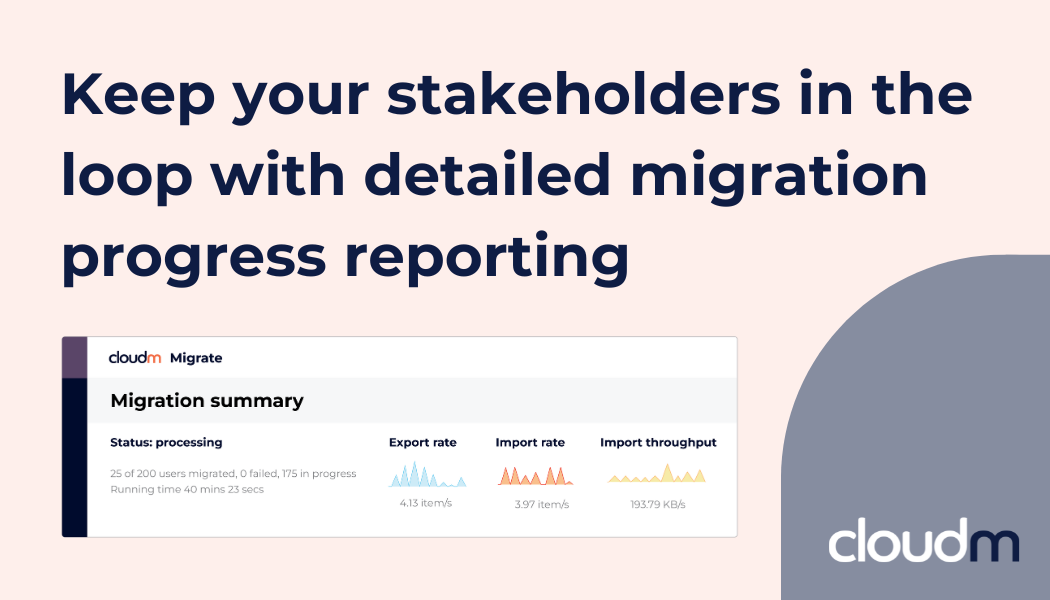
Advanced Migrate reporting is one of our latest features, designed to keep you in the loop during a migration.
 6 mins
Migrating to Google Workspace is a critical moment for any organization. Yet many organizations enter migration projects with little control and uncertain timelines once the process begins. In this article, we compare a migration without CloudM to one powered by it, highlighting how the right Google Workspace migration tool reduces complexity and improves visibility.
A Google Workspace migration without CloudM
The decision has been made to migrate to the cloud. Preparation is complete: data has been reviewed and organized, destination environments defined, configurations validated, and test migrations successfully executed. The final step remains, initiating the production migration.
As the process is about to begin, senior leadership requests confirmation that the migration is underway and asks to be kept informed of progress.
The migration starts and although the initial indicators suggest activity, the progress bar is showing minimal completion, and there is little insight available.
Almost immediately, questions begin to surface from across the organization. Department leaders request timelines so they can plan operational updates and business activities. However, without predictive estimates or real-time reporting, only broad approximations can be offered. Completion could take hours.
Progress advances unevenly, offering little context into what has actually been transferred, which users or departments are complete, or what data remains in progress. There is no clear way to validate success at a granular level while the migration is running.
As time passes, updates slow further, and the lack of status information raises concerns. Is the migration still actively processing, or has an error occurred? Leadership requests assurance that critical business data has been migrated successfully and remains intact. That assurance cannot yet be provided. There is no immediate visibility into data integrity, completion status, or whether issues are emerging that could impact users or operations.
By the end of the day, progress remains limited. The migration is left running overnight in the hope that momentum improves.
The following morning, the status is checked again, and the migration is still far from complete. At this point, the problem isn’t the migration. It’s the uncertainty around it.
A Google Workspace migration with CloudM
Now let’s take a look at a typical migration from an IT admin’s point of view, but this time using CloudM Google Workspace migration tool.
The final migration phase is ready to begin. Data has been cleaned and validated, destinations confirmed, configurations finalized, and the pre-migration scan successfully completed.
As the migration is initiated, leadership requests confirmation and ongoing updates. Rather than relying on manual status reports, visibility is provided through CloudM Migrate’s reporting capabilities. Senior stakeholders can be given access to real-time migration dashboards or receive migration summaries via email, allowing them to independently track progress, review the status of each migration pass, and understand where data is moving from and to.
This shared visibility reduces dependency on the IT team for constant updates and ensures consistent communication across the organization. Department leaders are kept informed of overall progress and success rates, helping them plan around the migration with confidence.
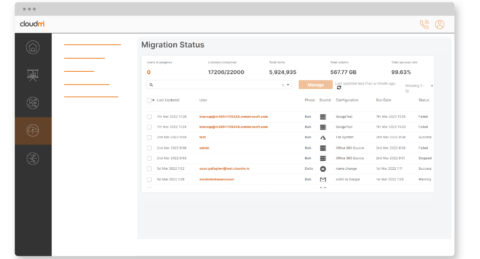
Access is tightly controlled using role-based permissions. Stakeholders are granted visibility into migration progress, eliminating the risk of accidental changes while maintaining transparency. IT retains full operational control, while leadership gains the insight they need to stay informed and aligned.
As a result, the migration proceeds with fewer interruptions and greater confidence at every level, demonstrating how a purpose-built Google Workspace data migration tool allows IT teams to focus on execution rather than status reporting.
Proven in practice: CloudM’s own Google Workspace migration
This approach isn’t theoretical. CloudM used CloudM Migrate as its Google Workspace migration tool during its own internal Google Workspace migration, applying the same reporting, access controls, and migration workflows used by customers today. Real-time visibility, detailed tracking, and controlled stakeholder access ensured the migration remained predictable, secure, and easy to manage from start to finish. The result was a smooth transition with minimal disruption and full confidence across IT and leadership teams. Read the full case study here: CloudM’s internal Google Workspace migration.
Know exactly where you are in the migration process with CloudM
Large-scale data migrations place significant demands on IT teams, and frequent status requests from stakeholders only add to that operational burden. As a purpose-built Google Workspace data migration tool, CloudM Migrate addresses this challenge by providing clear, real-time visibility throughout the migration process.
Through a centralized, easy-to-use dashboard, authorized users can view the current status of each migration within a project, including data sources, progress by migration pass, and cumulative metrics such as total items migrated and overall data volume transferred to the destination domain.
This level of transparency reduces the need for manual status checks, custom reporting, or recurring update emails. IT teams can focus on execution rather than communication, while stakeholders gain the insight they need to stay informed.
Access is governed by CloudM Migrate’s role-based access controls, ensuring stakeholders have read-only visibility without the ability to modify configurations, interrupt migrations, or introduce risk. As a result, organizations gain both transparency and control, without compromising security or operational integrity.
This is one of many reasons CloudM is trusted for large-scale migrations, providing the visibility and assurance organizations need. To explore CloudM’s Google Workspace migration tools or fully managed Serviced Migration options, book a call today!
Through a centralized, easy-to-use dashboard, authorized users can view the current status of each migration within a project, including data sources, progress by migration pass, and cumulative metrics such as total items migrated and overall data volume transferred to the destination domain.
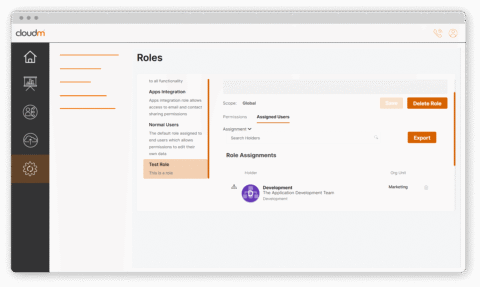
This level of transparency reduces the need for manual status checks, custom reporting, or recurring update emails. IT teams can focus on execution rather than communication, while stakeholders gain the insight they need to stay informed.
Access is governed by CloudM Migrate’s role-based access controls, ensuring stakeholders have read-only visibility without the ability to modify configurations, interrupt migrations, or introduce risk. As a result, organizations gain both transparency and control, without compromising security or operational integrity.
This is one of many reasons CloudM is trusted for large-scale migrations, providing the visibility and assurance organizations need. To explore CloudM’s Google Workspace migration tools or fully managed Serviced Migration options, book a call today!
Discover the benefits of migrating data with CloudM
Latest resources
How to Migrate Google to Google: A Complete Guide
April 2, 2026
Find out more
How to improve email signature marketing campaign management
March 24, 2026
Find out more
Business continuity: The Recurring Revenue Opportunity Inside Every Microsoft 365 Account
March 18, 2026
Find out more-
-
-
Business continuity: The Recurring Revenue Opportunity Inside Every Microsoft 365 Account
March 18, 2026