

CloudM Automate & Protect vs GAT Labs
Automate & Protect brings Google Workspace offboarding, Drive management, Backup, Archive and email signatures together in one connected platform.
GAT Labs is a broader suite of products for Google Workspace, focused on auditing, investigation, security controls and lifecycle automation.
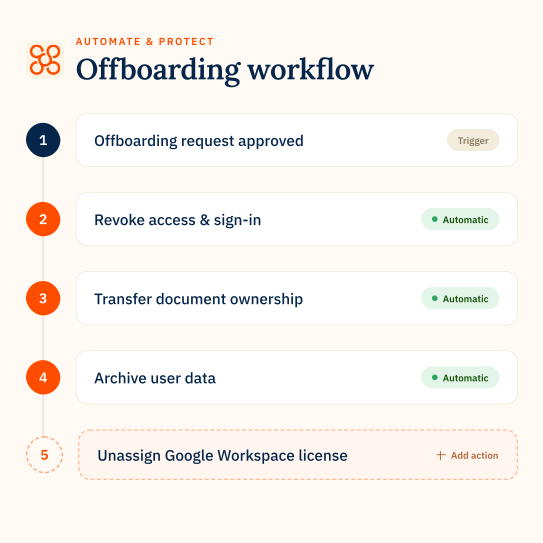
Automate & Protect
A connected platform for managing Google Workspace offboarding and Google Drive, plus data backup and archiving in one place.
✔ Automate repeatable offboarding with data archiving built in
✔ Back up Google Workspace data in your own storage
✔ Manage My Drive and Shared Drives across your organization
✔ Automate repeatable offboarding with data archiving built in
✔ Back up Google Workspace data in your own storage
✔ Manage My Drive and Shared Drives across your organization

GAT Labs
A suite of products for auditing, investigation, security controls and lifecycle automation. Some capabilities depend on additional GAT products.
✔ Investigate activity across Gmail, Drive, Calendar and users
✔ Monitor security risks, sharing and browser activity
✔ Automate onboarding, user changes and offboarding with GAT Flow
✔ Investigate activity across Gmail, Drive, Calendar and users
✔ Monitor security risks, sharing and browser activity
✔ Automate onboarding, user changes and offboarding with GAT Flow
How Automate & Protect compares in key areas
workflows
Offboarding that handles the data left behind
CloudM Automate & Protect
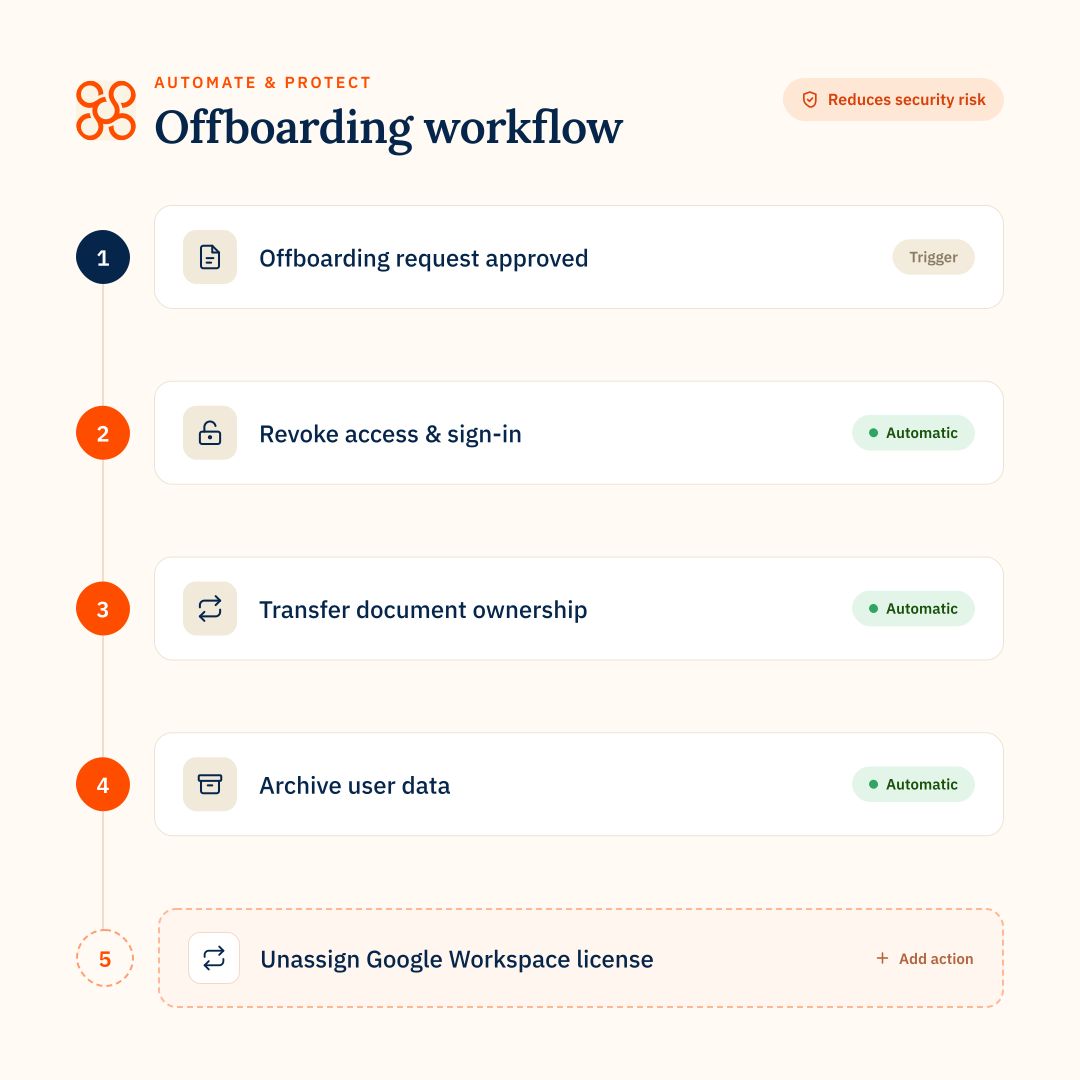
Workflows focuses on repeatable leaver processes, including securing accounts, redirecting email, transferring calendars and Drive ownership, updating Groups, archiving user data and freeing up licenses.
GAT Labs
GAT Flow supports onboarding, user changes and offboarding. Lifecycle workflows require GAT Flow in addition to GAT+ and Unlock.
The difference
GAT Flow covers more lifecycle stages. Automate & Protect goes further in handling leaver data during offboarding, including retention, freeing up licenses and restoring archived data later.
Google Drive management
Manage Drive at scale
CloudM Automate & Protect
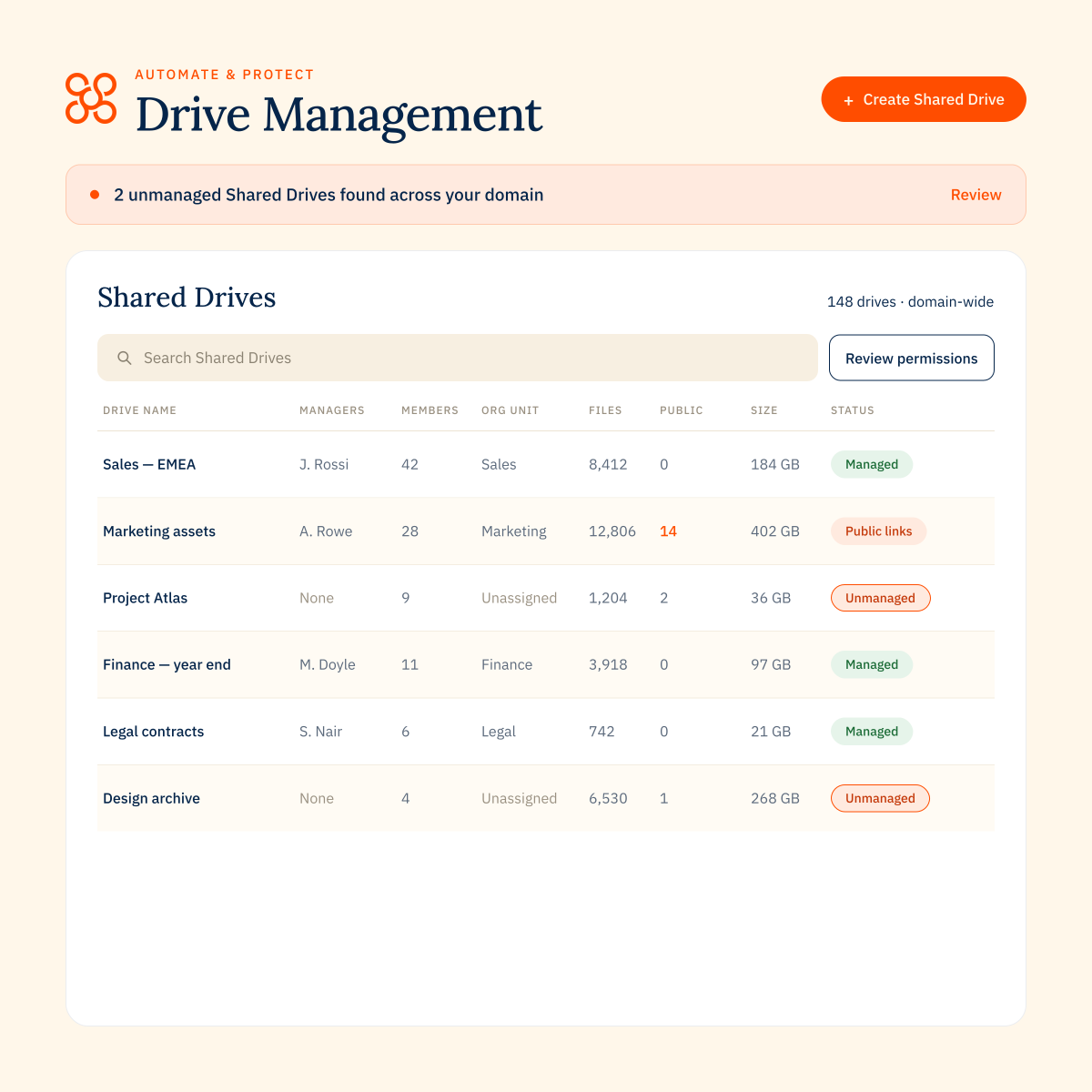
Designed for operational Drive management. Admins can see My Drives and Shared Drives across the organization, identify unmanaged Drives, external members and public links, then take action individually or in bulk.
GAT Labs
GAT Labs provides Drive auditing and activity visibility. More sensitive access and permission changes can require additional GAT products.
The difference
Automate & Protect brings day-to-day My Drive and Shared Drive management into one capability, including unmanaged Drive detection and bulk updates. GAT Labs goes deeper in auditing and investigation.
backup
Dedicated Google Workspace backup
CloudM Automate & Protect
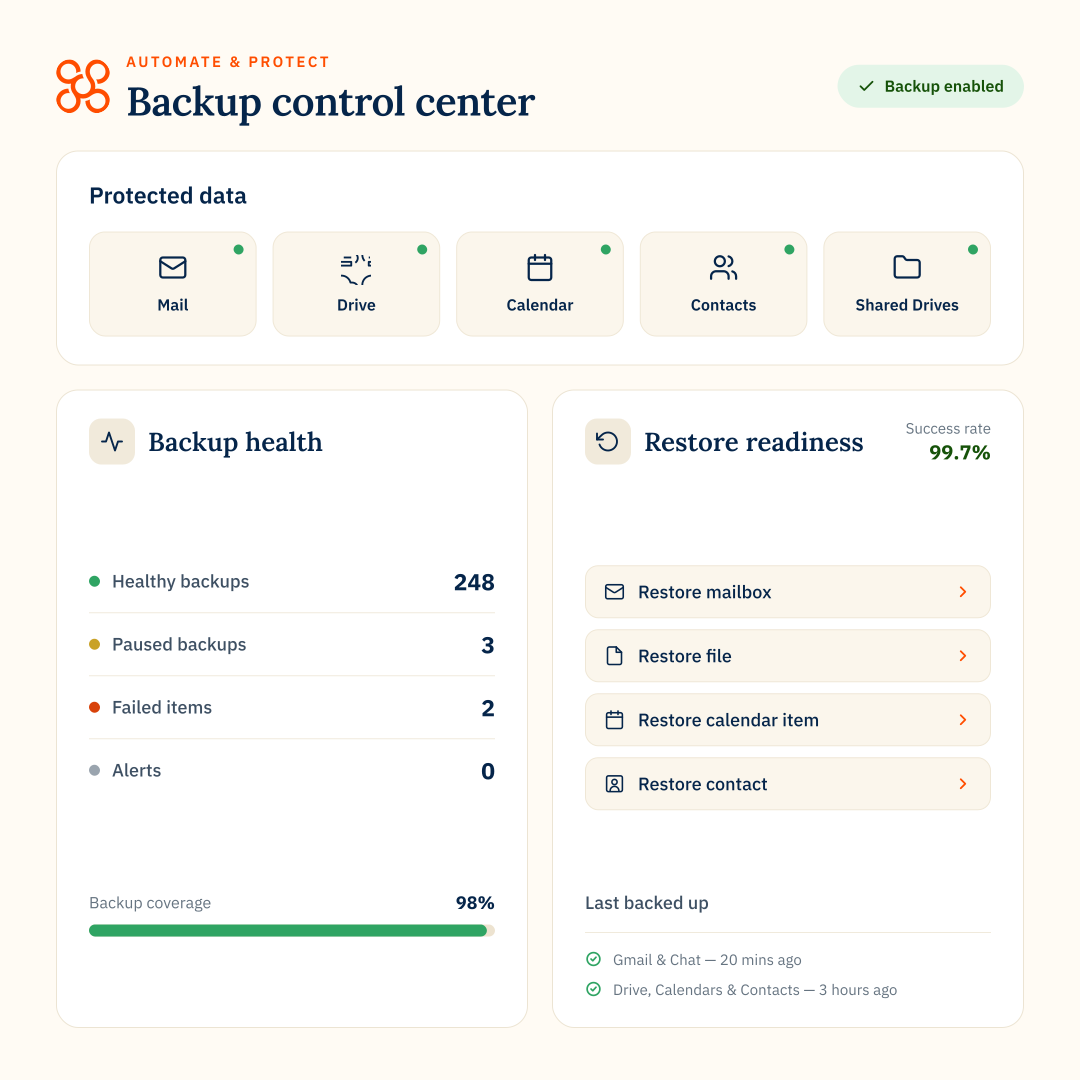
Dedicated Google Workspace backup protects and restores data across Gmail, Drive, Shared Drives, Calendar and Contacts, with backup data stored in the organization’s own cloud storage.
GAT Labs
GAT Labs does not offer dedicated Google Workspace backup. Its products focus on auditing, security, automation and access controls.
The difference
Automate & Protect provides dedicated backup and recovery in customer-controlled Google Cloud or AWS storage.
archive
Retain data, reclaim licenses
CloudM Automate & Protect
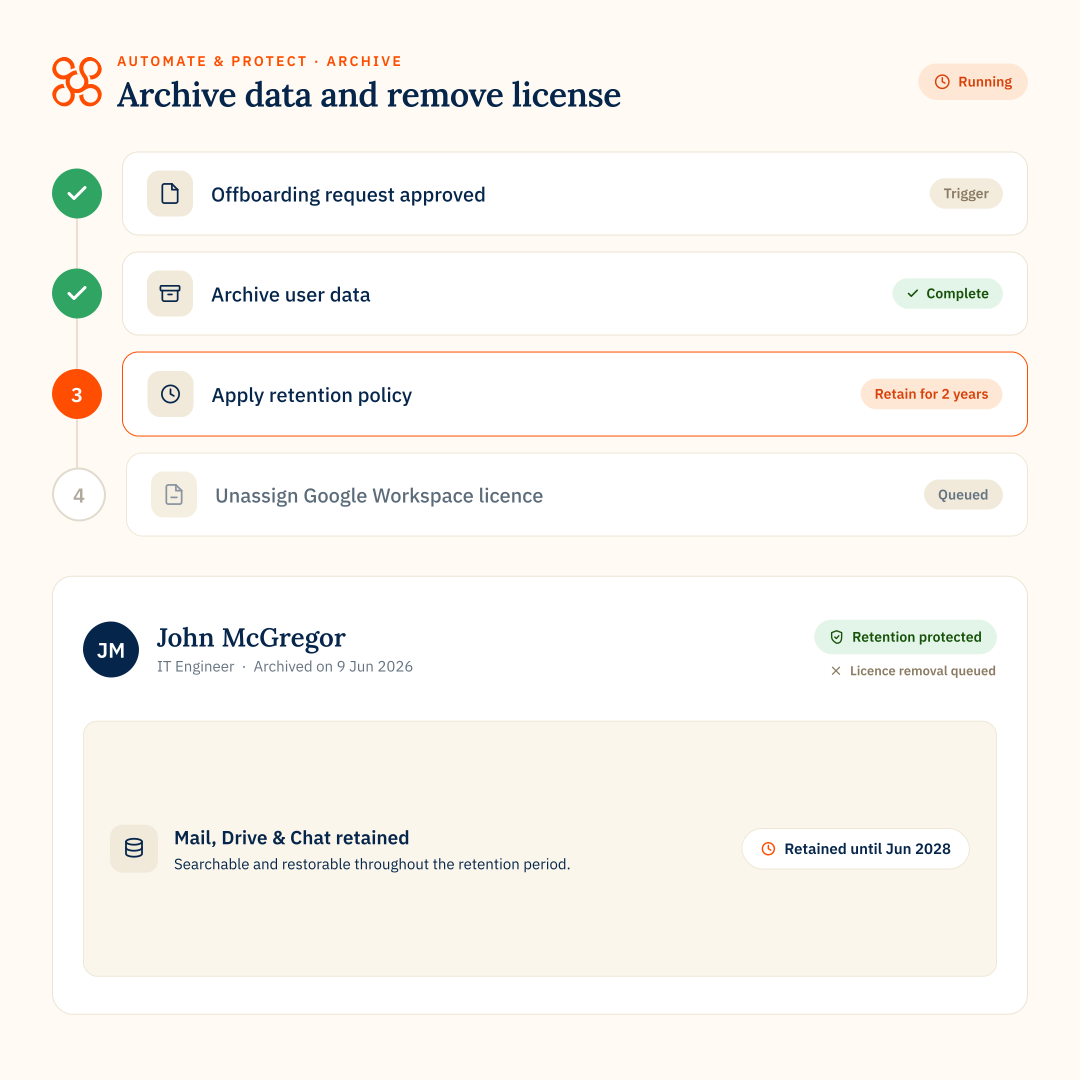
Archive former-user data in lower-cost customer-controlled storage, free the active Google Workspace license, and keep archived data searchable. Admins can restore individual archived items rather than restoring or reactivating the entire user.
GAT Labs
GAT Flow can archive users with Google Archived User licenses or consolidate leaver data by transferring files and ownership to other users or Shared Drives.
The difference
Automate & Protect combines lower-cost archiving with search and granular restore. GAT Labs doesn’t provide comparable archived-item search and restoration.
email signatures
Central Gmail signatures
CloudM Automate & Protect
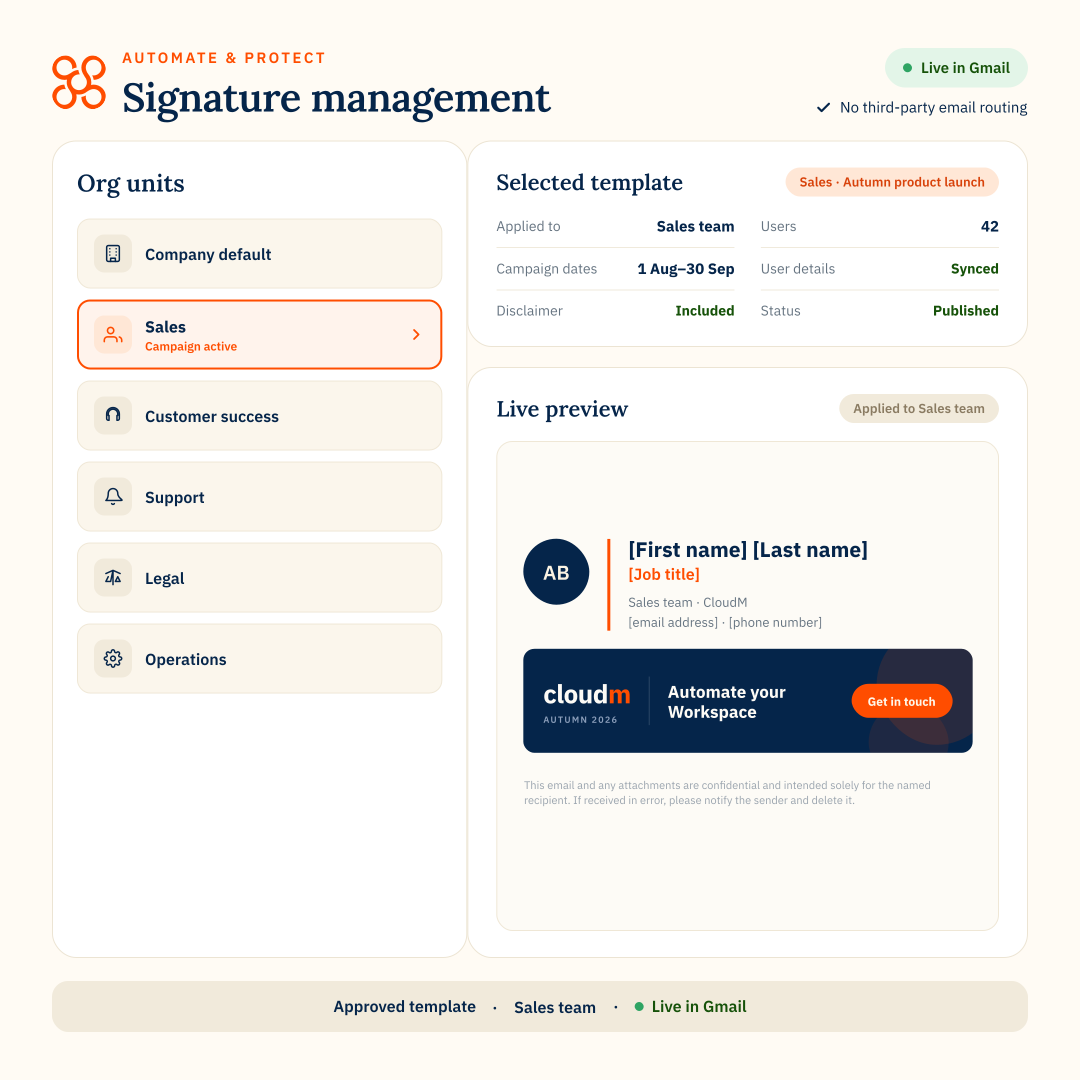
Manage Gmail signatures and campaign banners centrally, with targeting, scheduling and delegated access. Signatures are applied through the Gmail API, so email does not need to pass through a third party.
GAT Labs
GAT Flow can create and update Gmail signatures at scale using templates, user attributes and scheduled workflows.
The difference
Automate & Protect adds campaign banners, delegated access and no third-party email routing.
Where Automate & Protect excels
Automate & Protect is strongest when IT teams want to manage offboarding, data protection, retention and Google Drive in one connected product.
Offboarding with data retention
Connect leaver workflows with Archive and license release, while keeping Backup and Drive Management in the same product.
Drive management at scale
Manage My Drives and Shared Drives centrally, identify risks and take action across large Google Drives.
Dedicated backup and archive
Protect Workspace data in customer-controlled storage and retain former-user data with search and granular restore.
FEATURE COMPARISON
CloudM Automate & Protect vs GAT Labs
CloudM Automate & Protect
GAT Labs
Product structure
Automate & Protect brings Workflows, Backup, Archive, Drive Management and Signatures into one platform. GAT Labs separates capabilities across products including GAT+, Unlock, Flow, Shield and Signature Manager. Some products require others to be licensed.
One connected platform
Multiple products with dependencies
Offboarding workflows
Requires GAT+, Unlock and Flow
Onboarding workflows
–
Requires GAT+, Unlock and Flow
Dedicated Google Workspace backup
–
Customer-controlled backup storage
Store backup data in your own Google Cloud Storage or Amazon S3 buckets.
–
Granular restore from backup
Files, folders, email and user-level restore
–
Leaver data archiving
Automate & Protect can archive data into customer-controlled storage as an offboarding workflow step. GAT Labs keeps data in Google Workspace via AU license or consolidation
Dedicated archive or Google AU
Google AU or data consolidation
Search archived data
–
Granular restore from archive
–
Free up Google licenses after offboarding
Admin management of users’ My Drives
Requires GAT+ and Unlock
Shared Drive management
Requires GAT+ and Unlock
Unmanaged Shared Drive detection
–
External Drive sharing visibility
Bulk Drive updates
Enterprise plan
Requires GAT+ and Unlock
Email signatures
Automate & Protect applies signatures through the Gmail API, so email does not need to be routed through a third party.
Exportable audit logs
Historical activity investigation
–
Chrome & Edge browser controls
–
Approval for sensitive data access
–
Where GAT Labs may be a fit
GAT Labs may suit organizations that need broader lifecycle automation, deeper Workspace investigation or additional browser security controls. These capabilities are delivered across separate GAT products.
Broader lifecycle automation
GAT Flow supports onboarding, user changes and offboarding. Automate & Protect Workflows is focused on offboarding.
Deeper Workspace investigation
GAT+ provides more detailed historical activity and investigation across users, sharing and Workspace services.
Browser security controls
GAT Shield adds browser-level monitoring and controls for activities like uploads, downloads and copy/paste.
AUTOMATE & PROTECT VS GAT LABS
FAQs
- Overview
- Google Drive
- Workflows
- Backup & Archive
- Audit and compliance
TL;DR – What’s the difference between CloudM Automate & Protect and GAT Labs?
Both platforms help organizations manage Google Workspace, but they take different approaches.
Automate & Protect brings offboarding, Backup, Archive, Drive Management and email signatures into one connected platform. It is especially strong where leaver offboarding, data retention, license savings and day-to-day Drive management come together.
GAT Labs offers a broader suite of specialist products, with deeper capabilities in Workspace auditing, investigation and user activity monitoring in Google Chrome.
Automate & Protect brings offboarding, Backup, Archive, Drive Management and email signatures into one connected platform. It is especially strong where leaver offboarding, data retention, license savings and day-to-day Drive management come together.
GAT Labs offers a broader suite of specialist products, with deeper capabilities in Workspace auditing, investigation and user activity monitoring in Google Chrome.
Is Automate & Protect an alternative to GAT Labs?
Yes, for many Google Workspace management requirements.
There is significant overlap around offboarding, Drive management, license management and email signatures. Automate & Protect also adds dedicated Backup and Archive capabilities, including customer-controlled storage and granular restore.
GAT Labs goes further in areas such as deep Workspace auditing, historical activity analysis and broader employee lifecycle automation, including onboarding.
There is significant overlap around offboarding, Drive management, license management and email signatures. Automate & Protect also adds dedicated Backup and Archive capabilities, including customer-controlled storage and granular restore.
GAT Labs goes further in areas such as deep Workspace auditing, historical activity analysis and broader employee lifecycle automation, including onboarding.
Can Automate & Protect manage Google Shared Drives?
Yes. Drive Management within Automate & Protect gives administrators visibility across Shared Drives, including managers, members, external access, public links and sharing risks.
Admins can identify unmanaged Shared Drives, change permissions and membership, and, depending on the plan, apply changes across multiple Shared Drives at once.
Automate & Protect also gives admins visibility into users’ My Drives, so Drive management is not limited to Shared Drives.
Admins can identify unmanaged Shared Drives, change permissions and membership, and, depending on the plan, apply changes across multiple Shared Drives at once.
Automate & Protect also gives admins visibility into users’ My Drives, so Drive management is not limited to Shared Drives.
How do Automate & Protect and GAT Labs compare for workflow automation?
Automate & Protect Workflows focuses specifically on offboarding. It provides configurable steps for securing accounts, transferring data, managing access and handling licenses when someone leaves.
GAT Flow is a product by GAT Labs that covers a broader employee lifecycle, with separate workflows for onboarding, modifying existing users and offboarding.
Key difference: GAT Flow is broader across onboarding and ongoing user management. Automate & Protect is purpose-built around offboarding.
GAT Flow is a product by GAT Labs that covers a broader employee lifecycle, with separate workflows for onboarding, modifying existing users and offboarding.
Key difference: GAT Flow is broader across onboarding and ongoing user management. Automate & Protect is purpose-built around offboarding.
How do the platforms retain leaver data during offboarding?
Both can archive user data before a user license is removed, but the data is handled differently.
Automate & Protect can archive Mail, Drive and Chat into customer-controlled Google Cloud or AWS storage. The archive is indexed, so admins can later search for individual emails, files or chats and restore specific items or a wider user account. Estimate your archive savings.
GAT Flow can archive and unarchive users and can consolidate or transfer leaver data, but does not offer granular restore capability for individual archived items.
Key difference: Automate & Protect keeps archived data searchable and supports granular restore. GAT Flow’s documented archive and restore actions operate at the user level.
Automate & Protect can archive Mail, Drive and Chat into customer-controlled Google Cloud or AWS storage. The archive is indexed, so admins can later search for individual emails, files or chats and restore specific items or a wider user account. Estimate your archive savings.
GAT Flow can archive and unarchive users and can consolidate or transfer leaver data, but does not offer granular restore capability for individual archived items.
Key difference: Automate & Protect keeps archived data searchable and supports granular restore. GAT Flow’s documented archive and restore actions operate at the user level.
Can both platforms free up Google Workspace licenses after offboarding?
Yes. Both can change or remove Google Workspace license assignments as part of the offboarding process.
Can both platforms transfer Drive ownership when a user leaves?
Yes. Automate & Protect can transfer ownership of Drive content as part of an offboarding workflow, helping prevent files from becoming inaccessible when the user is removed.
GAT Flow also supports Drive ownership and access changes during offboarding.
GAT Flow also supports Drive ownership and access changes during offboarding.
Can both platforms transfer calendar events?
Yes. Automate & Protect can migrate a departing user’s calendar events to another user as part of offboarding.
GAT Flow also supports calendar transfer and other calendar actions during lifecycle workflows.
GAT Flow also supports calendar transfer and other calendar actions during lifecycle workflows.
Can both platforms redirect or delegate email?
Yes. Automate & Protect supports actions such as Gmail delegation and forwarding so incoming email can continue to reach the right person after someone leaves.
GAT Flow also provides Gmail actions for forwarding, delegation and email migration.
GAT Flow also provides Gmail actions for forwarding, delegation and email migration.
Can both platforms handle device and account access when someone leaves?
Yes. Both can automate security steps such as suspending the account, revoking tokens and sessions, changing passwords and handling device access.
Does GAT Labs offer Google Workspace backup like Automate & Protect?
No. GAT Labs does not offer a dedicated Google Workspace backup product. Its tools focus on auditing, automation, security and access controls. GAT’s own guidance recommends Google Vault, external backup tools or secure drives for backup.
Automate & Protect provides dedicated backup for Gmail, Drive, Shared Drives, Calendar, Contacts and Chat, with backup data stored in the organization’s own cloud storage.
Key difference: Backup is a native Automate & Protect capability; with GAT Labs, organizations need a separate backup solution.
Automate & Protect provides dedicated backup for Gmail, Drive, Shared Drives, Calendar, Contacts and Chat, with backup data stored in the organization’s own cloud storage.
Key difference: Backup is a native Automate & Protect capability; with GAT Labs, organizations need a separate backup solution.
What Google Workspace data can Automate & Protect back up?
Automate & Protect can back up Gmail, Drive, Shared Drives, Calendar, Contacts and Chat. Gmail and Chat can be backed up as frequently as every 20 minutes, while Drive, Calendar and Contacts can run as frequently as every four hours on the Enterprise plan.
Key difference: Backup is designed for recovery from deletion, loss or unwanted changes, rather than long-term archived leaver retention.
Key difference: Backup is designed for recovery from deletion, loss or unwanted changes, rather than long-term archived leaver retention.
Can both platforms search and restore archived data?
Automate & Protect supports search and granular restore from archived data. GAT Flow can archive and unarchive users, but doesn’t support restoring individual items from an archived user.
How do Automate & Protect and GAT Labs compare for Google Drive management?
Both products help IT admins find and manage Google Drive risks, but the product structure is different.
Automate & Protect provides My Drive and Shared Drive visibility and management within its Drive Management feature.
GAT Labs splits Drive capabilities across 3 products: GAT+, GAT Unlock and GAT Flow, depending on whether the task is auditing, sensitive content access or workflow automation.
Automate & Protect: Central visibility across users’ My Drives and Shared Drives, with controls for members, permissions, ownership, public access and bulk Shared Drive changes.
GAT Labs: GAT+ provides deep Drive auditing and reporting; GAT Unlock adds controlled access and ownership/permission actions; GAT Flow can automate selected Drive actions.
Automate & Protect provides My Drive and Shared Drive visibility and management within its Drive Management feature.
GAT Labs splits Drive capabilities across 3 products: GAT+, GAT Unlock and GAT Flow, depending on whether the task is auditing, sensitive content access or workflow automation.
Automate & Protect: Central visibility across users’ My Drives and Shared Drives, with controls for members, permissions, ownership, public access and bulk Shared Drive changes.
GAT Labs: GAT+ provides deep Drive auditing and reporting; GAT Unlock adds controlled access and ownership/permission actions; GAT Flow can automate selected Drive actions.
Can both identify external sharing and public links?
Yes. Automate & Protect gives visibility of external members, public links and sharing risks across My Drives and Shared Drives in an organization.
GAT+ can also identify externally shared files, public links and files owned external to the organization but shared internally.
Key difference: Automate & Protect presents these risks as part of day-to-day Drive management. GAT+ goes deeper into auditing, historical activity and recurring reporting around external sharing.
GAT+ can also identify externally shared files, public links and files owned external to the organization but shared internally.
Key difference: Automate & Protect presents these risks as part of day-to-day Drive management. GAT+ goes deeper into auditing, historical activity and recurring reporting around external sharing.
Can both manage Shared Drive permissions?
Yes. Automate & Protect lets admins review Shared Drive members and roles, add or remove members and update permissions and settings.
GAT Labs also supports permission changes, but different actions may involve GAT+, GAT Unlock or GAT Flow.
GAT Labs also supports permission changes, but different actions may involve GAT+, GAT Unlock or GAT Flow.
Can both make bulk changes across Google Drive?
Yes. Automate & Protect Enterprise plan includes bulk controls for making changes across multiple Shared Drives.
GAT+ supports bulk changes to sharing risks, while GAT Unlock provides additional bulk ownership and access controls for sensitive content.
GAT+ supports bulk changes to sharing risks, while GAT Unlock provides additional bulk ownership and access controls for sensitive content.
Can admins see a user’s My Drive without signing in as that user?
Automate & Protect: Yes. Admins can open a user’s My Drive from their Directory record and review files, folders, storage, sharing and access without signing in as that user.
GAT Labs: GAT+ provides domain-wide metadata and audit visibility into Drive content. Accessing the underlying file content or taking certain sensitive actions uses GAT Unlock and its approval controls.
GAT Labs: GAT+ provides domain-wide metadata and audit visibility into Drive content. Accessing the underlying file content or taking certain sensitive actions uses GAT Unlock and its approval controls.
How do the platforms handle unmanaged Shared Drives?
Automate & Protect: Explicitly identifies Shared Drives without the right managers, allowing admins to filter for unmanaged Drives and resolve them. It can also filter Drives by organizational unit, members, managers, permissions and sync status.
GAT Labs: Supports Shared Drive and file auditing, including ownership, sharing and permissions, but no equivalent feature for identifying unmanaged Shared Drives.
GAT Labs: Supports Shared Drive and file auditing, including ownership, sharing and permissions, but no equivalent feature for identifying unmanaged Shared Drives.
Do both platforms provide audit logs for compliance?
Yes, but at different levels.
Automate & Protect logs administrative actions across the domain with the user, timestamp and outcome, creating an audit trail for compliance reviews and internal reporting.
GAT Labs provides broader Workspace auditing, including deeper visibility into user activity, sharing and historical events.
Key difference: Automate & Protect focuses on evidencing administrative actions. GAT Labs goes further into user activity and forensic investigation.
Automate & Protect logs administrative actions across the domain with the user, timestamp and outcome, creating an audit trail for compliance reviews and internal reporting.
GAT Labs provides broader Workspace auditing, including deeper visibility into user activity, sharing and historical events.
Key difference: Automate & Protect focuses on evidencing administrative actions. GAT Labs goes further into user activity and forensic investigation.
Can Automate & Protect audit logs be exported?
Yes. Audit logs can be exported to CSV or Google Sheets, making it easier to review activity, share evidence with auditors and support internal compliance checks.
Key difference: Exportable logs make Automate & Protect useful for operational audit evidence without requiring a separate reporting tool.
Key difference: Exportable logs make Automate & Protect useful for operational audit evidence without requiring a separate reporting tool.
Which platform is stronger for investigating historical user activity?
GAT Labs is built for deeper investigation across Google Workspace, including historical activity, sharing, ownership and user behavior.
Automate & Protect provides an audit trail of administrative actions, but it is not designed as a forensic investigation platform.
Key difference: GAT Labs is stronger for investigating what users have done over time. Automate & Protect is stronger for tracking what administrators have changed.
Automate & Protect provides an audit trail of administrative actions, but it is not designed as a forensic investigation platform.
Key difference: GAT Labs is stronger for investigating what users have done over time. Automate & Protect is stronger for tracking what administrators have changed.
What’s the difference between operational audit logs and deeper Workspace auditing?
Operational audit logs show what an administrator changed. For example who performed an action, when it happened and whether it succeeded.
Deeper Workspace auditing looks more broadly at what users and data have been doing, such as file sharing, access, ownership and historical activity.
Key difference: Automate & Protect is focused on traceability of administrative actions. GAT Labs provides a broader view of user and data activity across Workspace.
Deeper Workspace auditing looks more broadly at what users and data have been doing, such as file sharing, access, ownership and historical activity.
Key difference: Automate & Protect is focused on traceability of administrative actions. GAT Labs provides a broader view of user and data activity across Workspace.