

CloudM Automate & Protect vs Patronum
Automate & Protect is built for Google Workspace data governance, protection and complex leaver offboarding.
Patronum is built for day-to-day Google Workspace user administration.
Automate & Protect
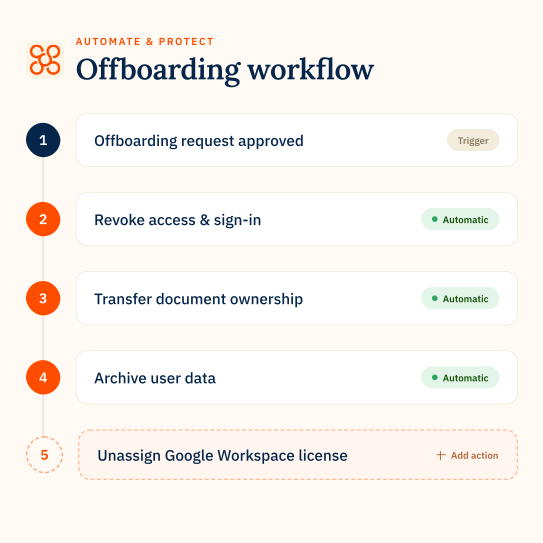
Automate & Protect brings together native Backup, Archive, Drive Management and advanced offboarding in one platform.
✔ Native Google Workspace Backup built into the platform
✔ Archive Mail, Drive and Chat and reclaim licenses during offboarding
✔ Find and fix issues across My Drives and Shared Drives at scale
✔ Native Google Workspace Backup built into the platform
✔ Archive Mail, Drive and Chat and reclaim licenses during offboarding
✔ Find and fix issues across My Drives and Shared Drives at scale

Patronum
Patronum focuses on managing users, access, settings and policies across Google Workspace.
✔ Backup is a third-party add-on via Afi.ai
✔ Archive Mail only
✔ Drive management focuses on user files and compliance policies
✔ Backup is a third-party add-on via Afi.ai
✔ Archive Mail only
✔ Drive management focuses on user files and compliance policies
How Automate & Protect compares in key areas
Google Drive management
Manage your Google Drive environment at scale
CloudM Automate & Protect
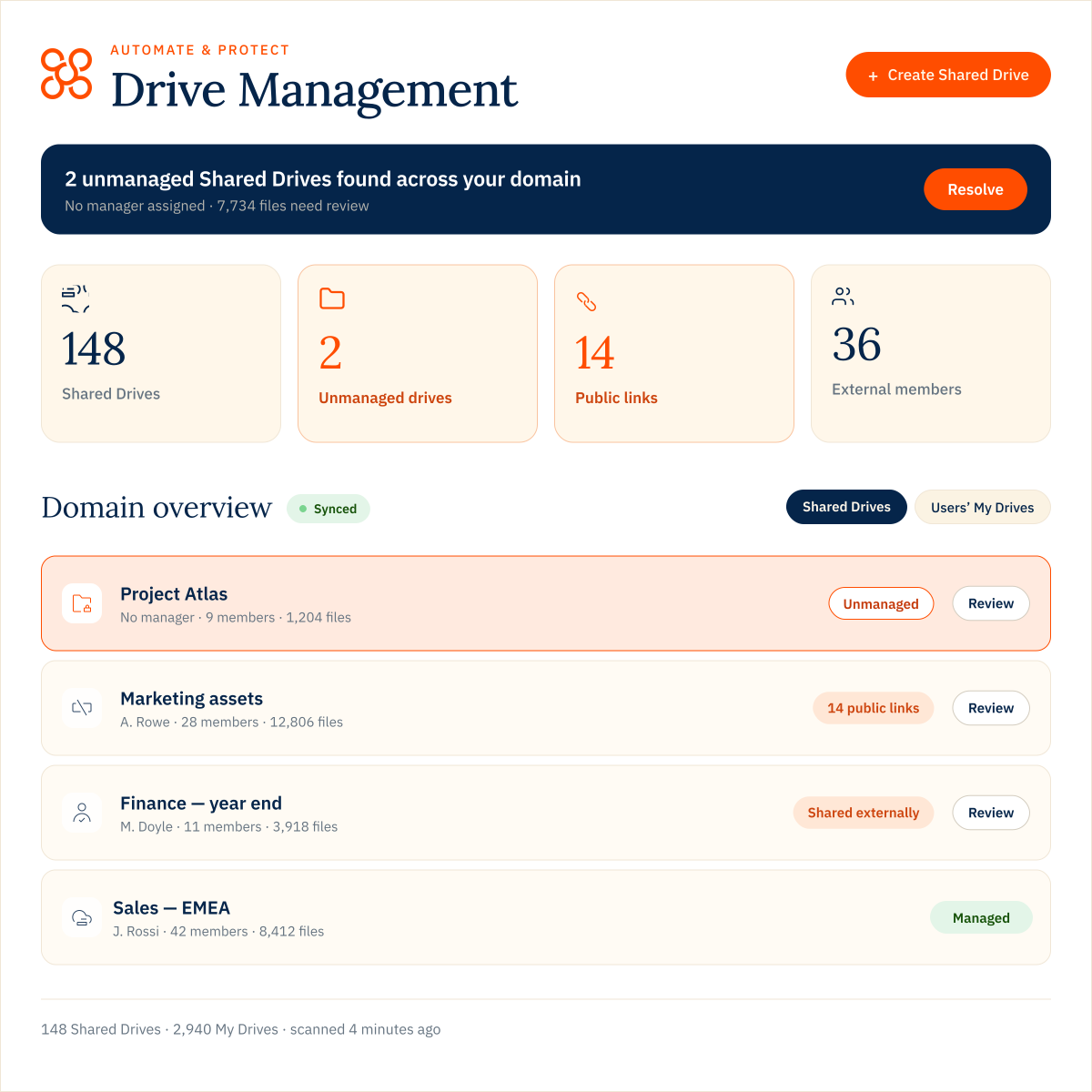
See risks across My Drives and Shared Drives, then take action at scale. Find unmanaged Drives, external managers, public links and other issues. Use one of nine ready-made queries or build your own, then apply fixes across the returned results.
Patronum
Patronum focuses on file-level access with its pre-set Drive policies automating actions like unsharing, access expiry and permission changes.
The difference
Automate & Protect finds and fixes issues across your entire Google Drive environment. Patronum focuses more on setting compliance rules and applying governance to Drive files.
workflows
Offboarding that handles the data left behind
CloudM Automate & Protect
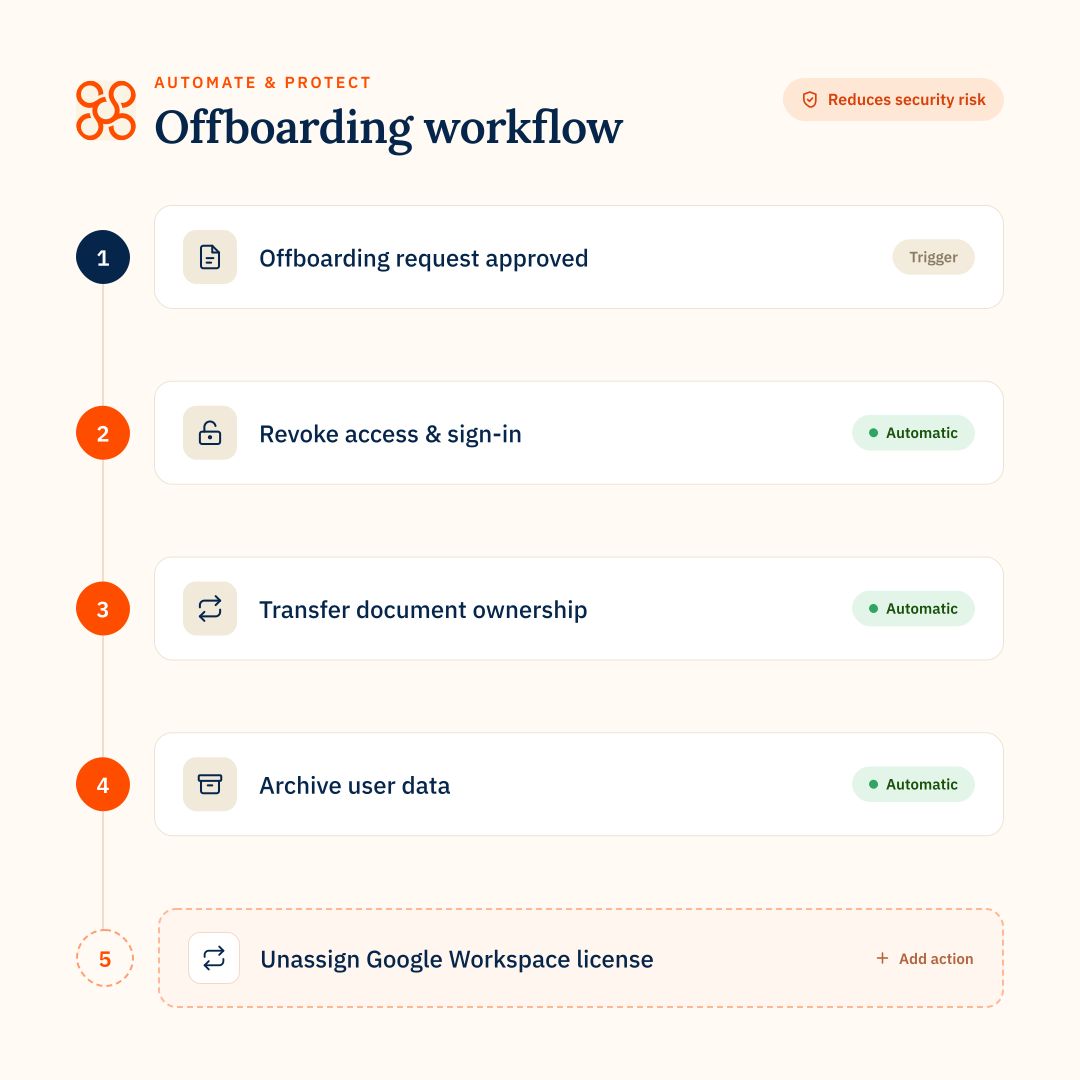
Automate complex leaver workflows with 30+ configurable offboarding steps across account security, data transfer, licensing, Archive and connected applications.
Patronum
Patronum automates onboarding and offboarding across Google Workspace users, files, calendars, contacts, Groups, devices and licenses.
The difference
Automate & Protect is designed for deeper Google Workspace offboarding orchestration, including managing data users leave behind. Patronum covers more of the employee lifecycle centered on Google Workspace administration.
backup
Native Google Workspace backup
CloudM Automate & Protect
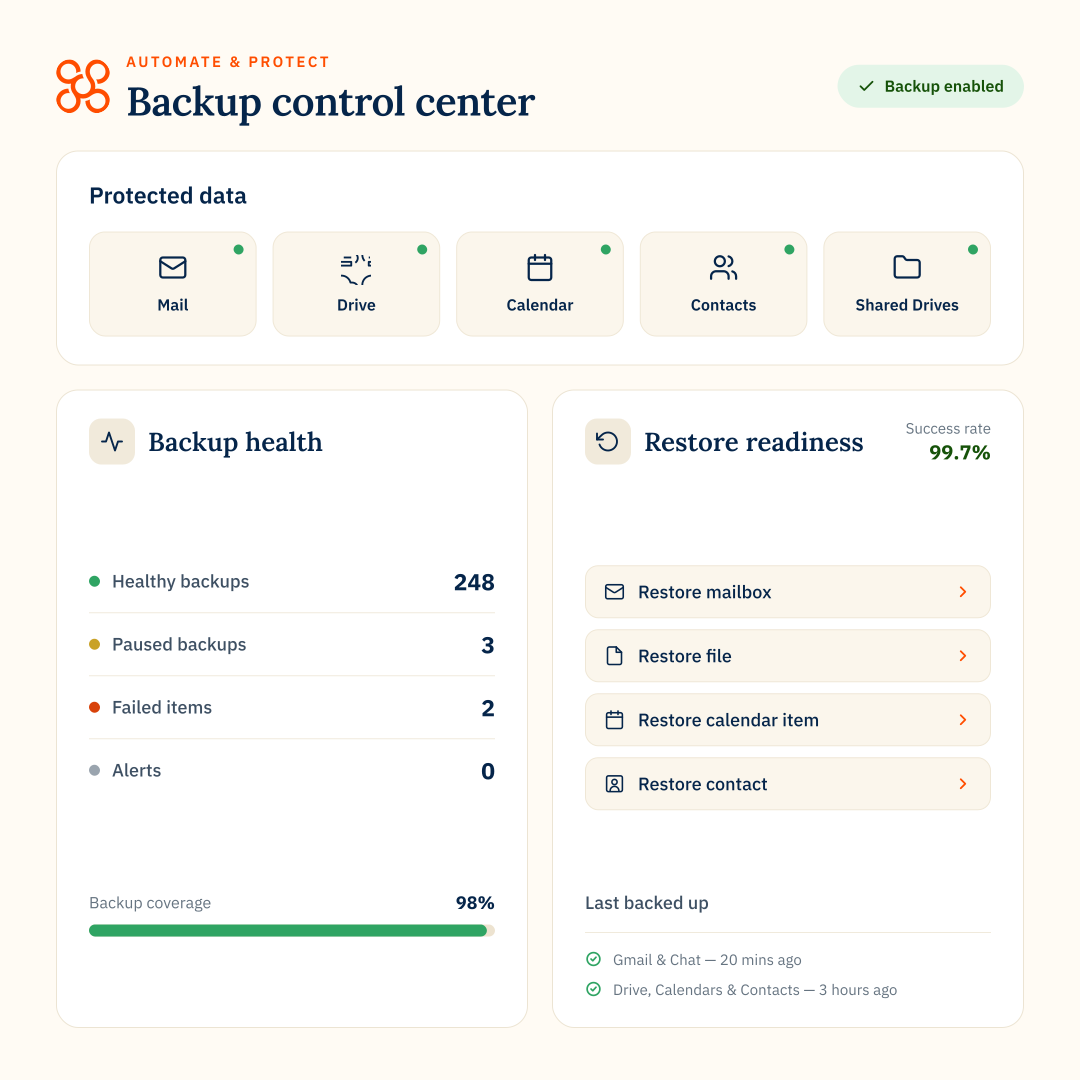
Backup is built natively into Automate & Protect, protecting Gmail, Drive, Shared Drives, Calendar, Contacts and Google Chat. Restore individual items, folders, users or Shared Drives, with backup policies, monitoring and customer-owned storage managed centrally.
Patronum
Backup is an additional cost via a separate application powered by Afi.ai. The application must be installed and connected to Patronum for backup actions to be triggered.
The difference
Automate & Protect provides backup and restore as a native part of the platform. Patronum connects its platform to a third-party backup product.
archive
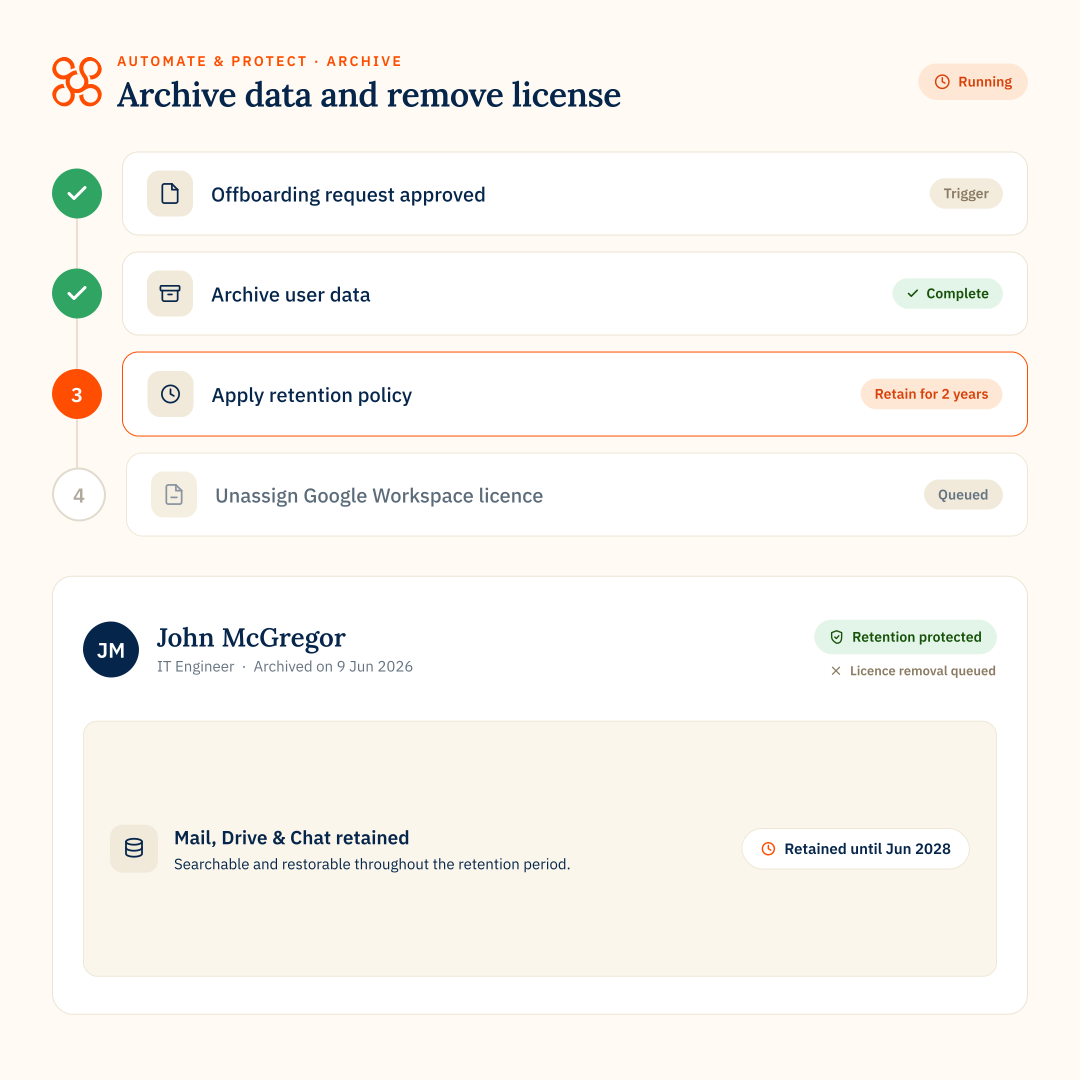
Retain data, reclaim licenses
CloudM Automate & Protect
Archive leaver mail, Drive and chat data in lower-cost, customer-controlled storage then remove the Google Workspace license. Retained data remains searchable and individual items retrievable.
Patronum
Patronum can archive mail to Google Cloud Storage during offboarding. Its archive capability does not extend to Drive or Chat.
The difference
While Patronum can archive and restore mail, Automate & Protect archives mail, Drive and chat, with granular search and recovery from a single email to an entire Google Drive.
email signatures
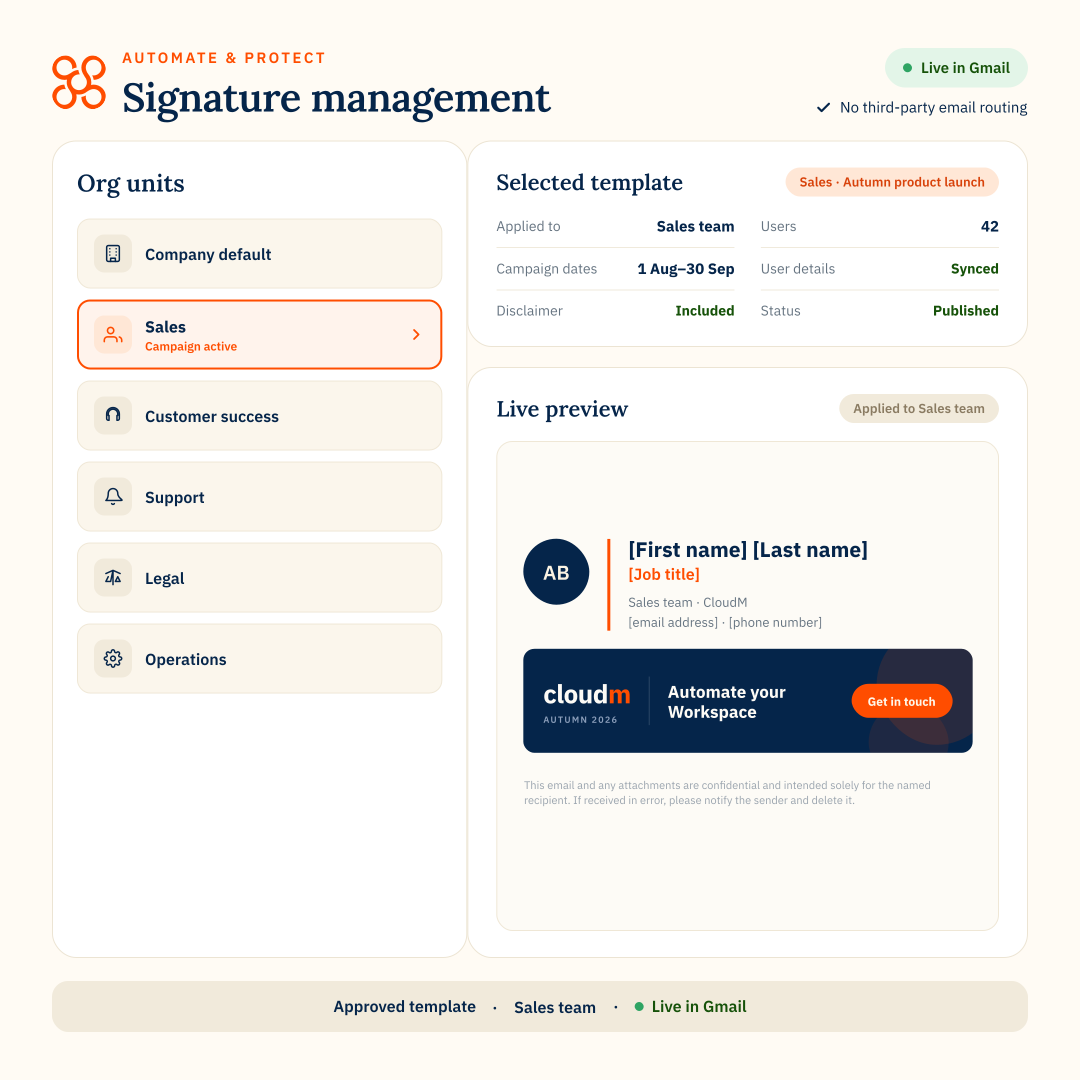
Central Gmail signatures
CloudM Automate & Protect
Manage Google Workspace mail signatures and campaign banners centrally, with granular targeting, scheduling and delegated access.
Patronum
Patronum also manages mail signatures centrally using Google Directory attributes and policy-based rules, with support for conditional content and banner tracking.
The difference
Both provide centralized signature management, but Automate & Protect adds scheduled campaigns and more granular audience targeting, so different signatures and banners can be planned and deployed automatically to specific user groups.
Where Automate & Protect excels
Automate & Protect is strongest when IT teams want to manage Google Workspace data, offboarding, protection and retention in one connected platform.
Protect data without another backup product
Backup is native to Automate & Protect rather than provided through a separate backup application. IT teams can manage backup and restore alongside Drive Management, Archive and offboarding in the same platform.
Retain more of the data employees leave behind
Archive can retain Mail, Drive and Chat data before a departing employee’s license is removed. Patronum’s documented Archive capability is focused on archiving Gmail data.
Find and fix Drive issues at scale
See risks across My Drives and Shared Drives, use pre-defined or custom queries to find specific issues, and take action directly. Higher tiers add bulk remediation across multiple Shared Drives.
FEATURE COMPARISON
CloudM Automate & Protect vs Patronum
CloudM Automate & Protect
Patronum
Offboarding workflows
Automate & Protect offers 30+ configurable offboarding steps
Onboarding workflows
–
Google Workspace backup
Backup and restore are built into Automate & Protect. Patronum connects to a separate Afi.ai-powered backup application.
Natively built in
Third-party add-on
Customer-controlled backup storage
Automate & Protect stores backup data in your own Google Cloud Storage or Amazon S3 environment.
–
Granular restore from backup
Files, folders, email and user-level restore
–
Annual price with backup
Automate & Protect starts at $18/user/year with native Backup included. Patronum starts at $8/user/year plus its Afi.ai-powered Backup adding $36/user/year.
From $18/user/year
From $44/user/year
Archive leaver data
Automate & Protect can retain Mail, Drive and Chat. Patronum archives Gmail data only.
Drive, Mail and Chat
Mail only
Search archived data
–
Granular restore from archive
Email restore only
Reclaim Google licenses after offboarding
Admin management of users’ My Drives
Shared Drive management
Bulk Shared Drive actions
Apply changes across multiple Shared Drives rather than working through them individually.
–
Unmanaged Shared Drive detection
Find Shared Drives with no internal manager so ownership can be reassigned.
–
Custom Google Drive queries
Build queries to find specific Drive issues across My Drives and Shared Drives.
–
Email signatures
Scheduled signature campaigns
–
Exportable audit logs
Where Patronum may be a fit
Patronum provides additional day-to-day Google Workspace user administration in areas that sit outside Automate & Protect’s core focus.
Onboarding
Patronum can create and configure users and apply policies as employees join.
Calendar and contact administration
Patronum can manage shared Calendar access and shared Contacts through policies outside the offboarding process.
Ongoing Gmail administration
Patronum can manage settings such as forwarding and delegated access outside the offboarding process.
AUTOMATE & PROTECT VS PATRONUM
FAQs
- Overview
- Google Drive
- Workflows
- Backup & Archive
TL;DR – What’s the difference between CloudM Automate & Protect and Patronum?
Both platforms help organizations manage Google Workspace, but they focus on different problems.
Automate & Protect focuses on managing, protecting and retaining Workspace data through Drive Management, Backup, Archive and automated offboarding.
Patronum focuses more broadly on user administration, including onboarding, Calendars, Contacts, Workspace settings and policies.
Automate & Protect focuses on managing, protecting and retaining Workspace data through Drive Management, Backup, Archive and automated offboarding.
Patronum focuses more broadly on user administration, including onboarding, Calendars, Contacts, Workspace settings and policies.
Is CloudM Automate & Protect only for organisations migrating to Google Workspace?
No. CloudM Migrate and Automate & Protect are separate products.
Automate & Protect is designed for ongoing Google Workspace operations including Drive Management, Backup, Archive, offboarding workflows and email signature management.
Automate & Protect is designed for ongoing Google Workspace operations including Drive Management, Backup, Archive, offboarding workflows and email signature management.
Are CloudM Automate & Protect and Patronum both designed specifically for Google Workspace?
Yes. Both provide administration and management capabilities specifically for Google Workspace.
Do both Automate & Protect and Patronum automate Google Workspace offboarding?
Automate & Protect concentrates on the higher-risk leaver process and what happens to the user’s data after departure.
Patronum supports the broader user lifecycle management of onboarding and offboarding.
Patronum supports the broader user lifecycle management of onboarding and offboarding.
How do both retain a leaver’s data during offboarding?
Automate & Protect can archive Mail, Drive and Chat data into your own Google Cloud Storage or AWS as part of offboarding.
Patronum can only archive a leaver’s Gmail data to Google Cloud Storage.
Patronum can only archive a leaver’s Gmail data to Google Cloud Storage.
Can both reclaim Google Workspace licenses during offboarding?
Automate & Protect Automate & Protect gives organizations a route to reclaim the full Workspace license while retaining Mail, Drive and Chat separately through Archive. It also supports Google Archived User licenses where required.
Patronum can remove licenses or replace them with alternatives such as Google Archived User or Cloud Identity Free as part of its offboarding policy.
Patronum can remove licenses or replace them with alternatives such as Google Archived User or Cloud Identity Free as part of its offboarding policy.
Does Patronum offer a native Google Workspace backup like Automate & Protect?
No. Automate & Protect includes native Google Workspace Backup within the same platform used for Drive Management, Workflows and Archive.
Patronum offers backup through a separate application powered by Afi.ai, which must be installed and connected to Patronum. Its offboarding policies can then trigger backups through that integration.
The difference: with Automate & Protect, backup is a built-in part of the platform rather than a third-party backup service connected to it.
Patronum offers backup through a separate application powered by Afi.ai, which must be installed and connected to Patronum. Its offboarding policies can then trigger backups through that integration.
The difference: with Automate & Protect, backup is a built-in part of the platform rather than a third-party backup service connected to it.
What Google Workspace data can each platform back up?
Automate & Protect backs up Gmail, Drive, Shared Drives, Calendar, Contacts and Google Chat.
Patronum backup is powered by Afi.ai, so the backup scope depends on that integrated service rather than a native Patronum backup engine.
Patronum backup is powered by Afi.ai, so the backup scope depends on that integrated service rather than a native Patronum backup engine.
Can organizations use their own backup storage?
Yes with Automate & Protect. Backup data is stored in customer-owned Google Cloud Storage or Amazon S3 buckets, giving organizations control over where their backup data resides.
How are backup and restore managed?
With Automate & Protect, backup policies, monitoring and restores are managed inside the platform. Administrators can restore individual items and folders, and restore Shared Drives back to the original Drive, another Drive or a new Shared Drive.
Patronum integrates with a separate backup service powered by Afi.ai. Patronum policies can trigger a backup, but there is no restore functionality in Patronum.
The difference: Automate & Protect provides the backup and restore capability itself, while Patronum acts as an administration layer over a separate backup product.
Patronum integrates with a separate backup service powered by Afi.ai. Patronum policies can trigger a backup, but there is no restore functionality in Patronum.
The difference: Automate & Protect provides the backup and restore capability itself, while Patronum acts as an administration layer over a separate backup product.
How does Archive differ between Automate & Protect and Patronum?
Automate & Protect can archive and restore Mail, Drive and Google Chat data, including supported Mail and Drive content retained in Google Vault.
Patronum can archive a leaver’s email to Google Cloud Storage.
The difference: Automate & Protect provides broader data retention across Mail, Drive and Chat, while Patronum’s Archive capability is focused on email.
Patronum can archive a leaver’s email to Google Cloud Storage.
The difference: Automate & Protect provides broader data retention across Mail, Drive and Chat, while Patronum’s Archive capability is focused on email.
How do Automate & Protect and Patronum compare for Google Drive management?
Automate & Protect is designed to find and fix issues across My Drives and Shared Drives, with organisation-wide visibility, pre-defined and custom queries, and bulk actions across multiple Shared Drives.
Patronum focuses more on file-level governance, using pre-set policies to identify files by conditions such as sharing, labels or age and then automate actions like unsharing or changing permissions.
Patronum focuses more on file-level governance, using pre-set policies to identify files by conditions such as sharing, labels or age and then automate actions like unsharing or changing permissions.
Can both identify external sharing and public links?
Yes, but they surface and manage those risks differently.
Automate & Protect gives admins a broad centralized view and management across your organization’s My Drives and Shared Drives, including external members, public links and unmanaged Shared Drives.
Patronum can identify externally shared files access through Drive policies. To manage Drive files, the admin must select an individual user and browse that user’s My Drive and Shared Drives. For bulk updates, Patronum relies on Drive policies and CSV export and import.
Automate & Protect gives admins a broad centralized view and management across your organization’s My Drives and Shared Drives, including external members, public links and unmanaged Shared Drives.
Patronum can identify externally shared files access through Drive policies. To manage Drive files, the admin must select an individual user and browse that user’s My Drive and Shared Drives. For bulk updates, Patronum relies on Drive policies and CSV export and import.
How do the platforms handle unmanaged Shared Drives?
Automate & Protect can identify Shared Drives with no internal manager and surface them centrally for review. Admins can then take direct action, such as assigning an internal manager or changing membership, with bulk updates available across multiple Shared Drives on the Enterprise tier.
Patronum focuses on user-level file management and file compliance than on identifying unmanaged Shared Drives as a distinct organisation-wide issue.
The difference: Automate & Protect is designed to find and fix Shared Drive governance problems directly, including Drives with no internal manager. Patronum focuses more on the files and permissions within Shared Drives than on managing the Shared Drives themselves.
Patronum focuses on user-level file management and file compliance than on identifying unmanaged Shared Drives as a distinct organisation-wide issue.
The difference: Automate & Protect is designed to find and fix Shared Drive governance problems directly, including Drives with no internal manager. Patronum focuses more on the files and permissions within Shared Drives than on managing the Shared Drives themselves.
Can both take action across multiple Shared Drives?
Automate & Protect allows you to build custom queries to find Shared Drives matching specific conditions, then review and take action across those results.
Our Enterprise plan lets you make bulk updates across multiple Shared Drives at once rather than working through them individually.
Patronum supports bulk updates mainly through pre-applied Drive Policies at file level. For some sharing changes downloading a CSV export, editing and re-import is required.
The difference: Automate & Protect is designed for finding and fixing Drive-level issues across multiple Shared Drives from the same management experience. Patronum’s bulk controls are applied based on pre-existing policies.
Our Enterprise plan lets you make bulk updates across multiple Shared Drives at once rather than working through them individually.
Patronum supports bulk updates mainly through pre-applied Drive Policies at file level. For some sharing changes downloading a CSV export, editing and re-import is required.
The difference: Automate & Protect is designed for finding and fixing Drive-level issues across multiple Shared Drives from the same management experience. Patronum’s bulk controls are applied based on pre-existing policies.