
HOW IT WORKS

Okta removes access. Automate & Protect handles the data left behind
When Okta suspends a Google Workspace user, critical data isn’t protected, file ownership is left in limbo, and excess licenses continue to cost.
Automate & Protect automatically eliminates these risks by archiving data, transferring file ownership, and reclaiming licenses, with no direct integration required.
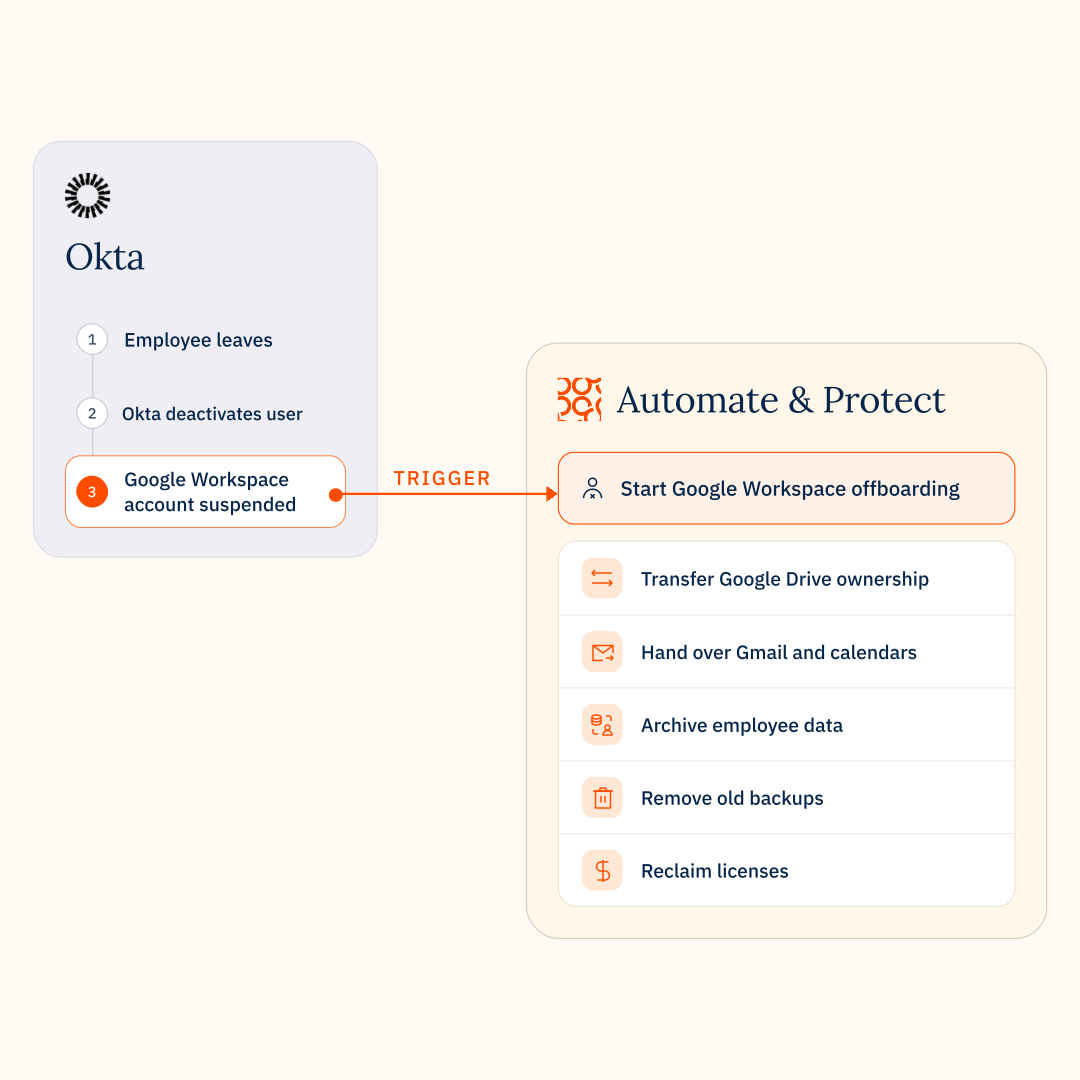
Trigger
In Okta an IT admin deactivates a leaving employee’s account.
Handoff
Okta suspends the employee’s account in Google Workspace.
Detection
Automate & Protect detects the Google Workspace suspension and triggers the configured offboarding workflow for that user.
Deep offboarding
Automate & Protect automatically archives data, transfers ownership and manages communications according to the pre-built no-code workflow.
License reclaimed
Once the leaver’s data is protected and transferred, Automate & Protect removes the Google Workspace license.
Why automate & protect
Access is gone. But the work isn’t finished.
Suspending a Google Workspace account doesn’t preserve its data, transfer its resources or stop unnecessary license costs. Automate & Protect completes these tasks automatically, so nothing important is left behind.

Preserve business-critical data

Keep business moving

Automate Google Workspace cleanup

Reclaim licenses and cut costs
no-code offboarding workflows
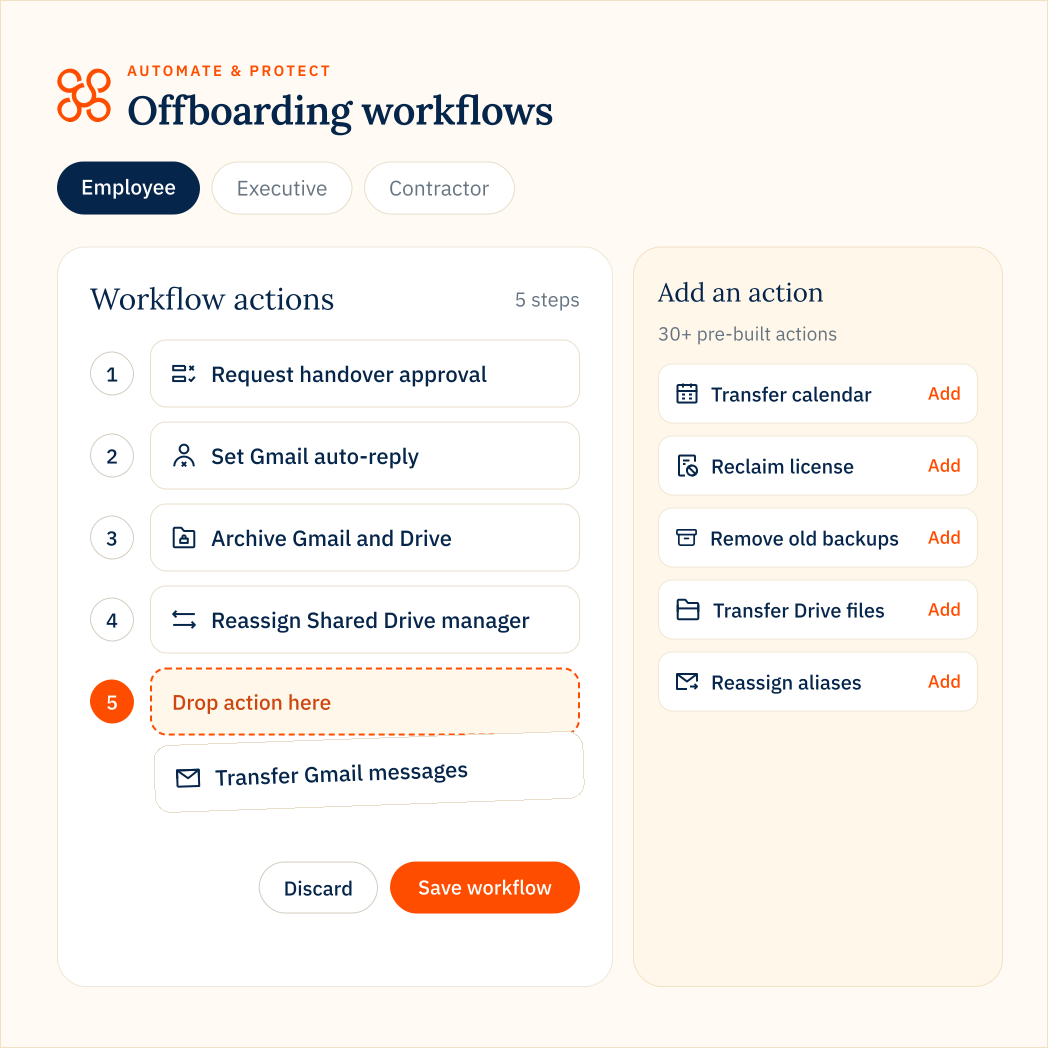
Different leavers need different workflows
Not every leaving employee carries the same risks. An executive may need additional approvals and extended data retention, while a contractor may only need a simple handover. Build repeatable workflows from 34+ pre-built actions to match the requirements of different teams and roles.
-
Employee
Move data to low-cost Google Cloud Storage (GCS), transfer files and calendars to colleagues, and reclaim unused licenses. -
Executive
Add approval checkpoints, retain sensitive business records and coordinate a controlled handover. -
Contractor
Transfer work to the relevant team, clean up remaining Google Workspace resources and remove unnecessary licenses.
The number of offboarding workflows available depends on your Automate & Protect plan.
OKTA + AUTOMATE & PROTECT
FAQs
- Integration & setup
- Workflows & automation
- Data retention & costs
Do I need to connect Automate & Protect directly to Okta?
No direct Okta integration or custom scripting is required.
Okta and Automate & Protect connect independently to Google Workspace, each handling different parts of employee offboarding.
Okta manages identity and access, while Automate & Protect manages Google Workspace data, ownership, retention and offboarding tasks.
No direct integration or custom scripting is required. Simply configure the appropriate offboarding workflows and enable automatic offboarding for suspended accounts in Automate & Protect.
Okta and Automate & Protect connect independently to Google Workspace, each handling different parts of employee offboarding.
Okta manages identity and access, while Automate & Protect manages Google Workspace data, ownership, retention and offboarding tasks.
No direct integration or custom scripting is required. Simply configure the appropriate offboarding workflows and enable automatic offboarding for suspended accounts in Automate & Protect.
How does Automate & Protect detect account changes made by Okta?
The process happens instantly through Google Workspace APIs and push notifications:
1. The Okta Action: Okta communicates with Google Workspace to suspend a user account.
2. The Live Detection: Automate & Protect monitors your Google Workspace profile status. With automatic profile synchronization enabled, it listens for native Google push notifications.
3. The Instant Trigger: The microsecond Google registers the suspension from Okta, it alerts Automate & Protect to instantly launch your configured offboarding workflow—without waiting for a scheduled daily domain sync.
1. The Okta Action: Okta communicates with Google Workspace to suspend a user account.
2. The Live Detection: Automate & Protect monitors your Google Workspace profile status. With automatic profile synchronization enabled, it listens for native Google push notifications.
3. The Instant Trigger: The microsecond Google registers the suspension from Okta, it alerts Automate & Protect to instantly launch your configured offboarding workflow—without waiting for a scheduled daily domain sync.
Why can’t Okta handle Google Drive data transfer and archiving natively?
Okta is designed for identity management, not data management. When Okta sends a suspension command to Google Workspace, it only disables the login path. Google’s infrastructure does not automatically transfer Gmail data, clean up calendars, or migrate Drive file structures to a manager upon deletion or suspension. Automate & Protect acts as the data-handling engine that Okta lacks—preserving data ownership and structures seamlessly.
Can Automate & Protect replace GAM scripts or Okta Workflows?
Automate & Protect can replace manual GAM scripts and complement or replace selected Okta Workflows for Google Workspace offboarding.
Its pre-built actions automate data archiving, ownership transfers, communication handovers and license recovery, reducing reliance on custom scripts and manual administration.
Organizations can continue using Okta Workflows for broader identity and application automation while Automate & Protect handles Google Workspace-specific tasks.
For more technical details, see our guide to using Automate & Protect alongside Okta.
Its pre-built actions automate data archiving, ownership transfers, communication handovers and license recovery, reducing reliance on custom scripts and manual administration.
Organizations can continue using Okta Workflows for broader identity and application automation while Automate & Protect handles Google Workspace-specific tasks.
For more technical details, see our guide to using Automate & Protect alongside Okta.
What happens to file sharing and document links when a user is offboarded with Automate & Protect?
Automate & Protect automatically preserves document sharing hierarchies. Instead of letting critical data get lost or cutting off access for active team members who rely on a leaver’s shared files, the platform cleanly transfers My Drive ownership to a designated manager or moves the assets to a company-controlled Shared Drive. This ensures collaboration remains entirely uninterrupted.
How does Automate & Protect help save money on Google Workspace licensing fees?
It automatically frees up active licenses so you stop paying for unused accounts.
Keeping an account suspended indefinitely just to preserve its data means continual billing for that seat.
Automate & Protect extracts and archives the user data first in your own cloud environment, safely moves or reclaims the license, and allows you to completely de-provision the account without the fear of data loss.
Keeping an account suspended indefinitely just to preserve its data means continual billing for that seat.
Automate & Protect extracts and archives the user data first in your own cloud environment, safely moves or reclaims the license, and allows you to completely de-provision the account without the fear of data loss.
How do we handle e-Discovery and Google Vault compliance without overpaying for licenses?
Automate & Protect supports different retention approaches depending on your organization’s requirements.
For employees whose data must remain available for legal holds or eDiscovery, you can retain their Google Archived User (AU) licenses to preserve access through Google Vault.
For other departing employees, CloudM Archive can preserve Gmail, Drive and other supported data, including eligible Vault-retained data, in your own Google Cloud Storage. Once the required data has been archived and verified, you can remove their Google Workspace accounts and associated licenses.
This approach helps reduce ongoing license costs while retaining important business data. CloudM Archive provides searchable, restorable data preservation, but does not replace Google Vault’s eDiscovery and legal hold capabilities.
For employees whose data must remain available for legal holds or eDiscovery, you can retain their Google Archived User (AU) licenses to preserve access through Google Vault.
For other departing employees, CloudM Archive can preserve Gmail, Drive and other supported data, including eligible Vault-retained data, in your own Google Cloud Storage. Once the required data has been archived and verified, you can remove their Google Workspace accounts and associated licenses.
This approach helps reduce ongoing license costs while retaining important business data. CloudM Archive provides searchable, restorable data preservation, but does not replace Google Vault’s eDiscovery and legal hold capabilities.
If data is archived in Google Cloud Storage, can we still search and restore it?
Yes. Moving data to archive storage does not mean losing visibility. Your IT and legal teams get a centralized control panel with granular search and restore capabilities.
You can quickly search through archived data, locate specific files or emails, and restore directly back into your environment, all without paying for a premium active Google Workspace seat or an AU license.
You can quickly search through archived data, locate specific files or emails, and restore directly back into your environment, all without paying for a premium active Google Workspace seat or an AU license.