What a Google Workspace offboarding workflow actually looks like
- Author: Lana Ginns
- Category: User lifecycle management

For education IT teams, offboarding often happens at scale. A single leaver might be easy to manage manually. Hundreds of students graduating at the same time, alongside staff departures and contract changes, is much harder.
That is where workflow automation can help. Instead of relying on someone to remember every step for every user, IT teams can define a repeatable sequence of actions and apply it consistently across Google Workspace.
The result is a more predictable offboarding process, with less repetitive administration and less chance of important steps being missed.
What is an automated offboarding workflow?
An offboarding workflow is a predefined sequence of actions that happens when someone leaves the institution.
Rather than managing each account manually, IT teams can decide in advance what should happen to access, data, Groups, licenses and the account itself.
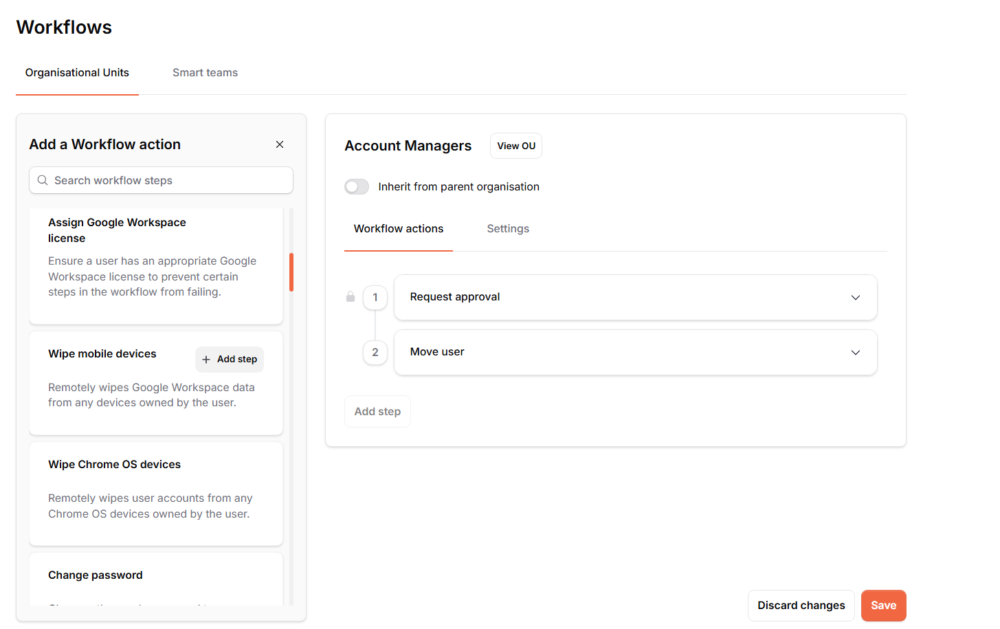
With CloudM offboarding workflows, those actions can be combined into a repeatable process.
For example, a workflow might:
- Revoke access
- Remove the user from Groups
- Transfer their data
- Archive content that needs to be retained
- Remove or reassign licenses
- Suspend or delete the account
The exact sequence depends on the type of user and what the institution needs to keep.
Start with the right trigger
A workflow needs a clear starting point. In education, that might be a known leaving date, the end of an academic year, or an IT administrator manually starting the process when a departure is confirmed.
Planning the trigger matters because offboarding often needs to happen at the right moment, not simply as soon as someone is marked as leaving.
For example, a student may need access until the end of term, while a departing staff member may need their account secured immediately.
Automate & Protect supports different ways to start an offboarding workflow, including scheduled workflows based on an end date.
Secure the account first
The first stage of an offboarding workflow is usually about making sure the former user can no longer access the environment. Depending on the process, this can include actions such as:
- Suspending access
- Changing the password
- Revoking sign-in or authentication methods
- Removing access to Groups or other resources
Doing this early in the sequence reduces the risk of a former user retaining access while other offboarding actions are still being completed.
The important part is consistency. Every user in the same leaver group should go through the same agreed process.
Transfer ownership and data
Once access has been dealt with, IT teams need to decide what happens to the data the user leaves behind.
For staff in particular, that can include files, calendars, Groups or other content that still needs to be used by colleagues.
A workflow can help make sure this data is transferred to the right person before the account is removed. That might mean:
- Transferring Google Drive data
- Assigning a recipient for user content
- Moving ownership where required
- Preserving important calendar information
- Reassigning Group ownership or membership
This is where predefined workflows are especially useful. IT teams can decide who receives what before the leaver process begins.
Decide what should be retained
Not all leaver data needs to remain active, but some of it may still need to be kept. That could be for operational, legal, historical or internal policy reasons.
CloudM Archive can be included as part of the wider offboarding process, helping institutions retain former user data without keeping unnecessary active accounts. This gives IT teams a clearer distinction between:
- Data that should be transferred to another user
- Data that should remain available in the live environment
- Data that only needs to be retained for future access
That decision is easier to manage when it is built into the workflow rather than made separately for every leaver.
Finish the account lifecycle
Once access, ownership and retention have been handled, the final steps can deal with the account itself. Depending on the institution’s process, that may include:
- Removing or changing licenses
- Suspending the account
- Applying an Archived User license where appropriate
- Deleting the account
The order matters. Deleting an account too early can create unnecessary recovery work. Leaving it active for too long can create clutter and unnecessary administration.
A well-designed workflow makes sure those final actions happen only after the earlier steps are complete.
Why sequencing matters
The value of workflow automation is not simply that multiple actions happen automatically. It is that they happen in the right order. For example:
Revoke access → transfer data → archive required content → remove license → delete account
That sequence protects the institution from losing data before it has been transferred or retained. It also makes the process easier to review and repeat because IT teams are no longer relying on an informal checklist or individual memory.
Students and staff may need different workflows
One workflow will not always suit every type of leaver. Students, staff and temporary users can have very different requirements.
Student workflow | A student leaving at the end of the academic year may need:
- Access removed on a set date
- Required data transferred or retained
- Licenses removed
- Account suspended or deleted
Staff workflow | A staff member may need:
- Immediate access removal
- Drive data transferred
- Group or calendar ownership reassigned
- Important data archived
- Licenses removed
- Account suspended or deleted
Temporary or contract staff | For users with a known end date, the process can be prepared in advance and scheduled to start automatically when their access should end.
Creating different workflows for different groups helps IT teams avoid treating every leaver in the same way.
Make offboarding repeatable
Education IT teams already know that student and staff departures will happen.
The real challenge is making sure the process is consistent every time, especially when hundreds or thousands of accounts need attention within the same period.
By defining triggers, sequencing actions and creating different workflows for different user groups, IT teams can turn offboarding from a manual checklist into a repeatable process.
CloudM Automate & Protect helps education institutions manage that process across Google Workspace, with offboarding workflows, Archive, Backup and other tools designed to reduce repetitive administration.
Build a more consistent offboarding process
See how CloudM can help your IT team automate student and staff offboarding across Google Workspace.