CloudM Backup 1.9: Strengthen your Google Workspace backup profile with CloudM
- Author: Lana Ginns
- Category: News & updates
We’re excited to announce the latest release of CloudM Backup 1.9 and Archive 2.6, designed to give you even greater control and security over your Google Workspace backup and data. This release introduces powerful new features to enhance your data protection strategy and help optimize your storage costs.
Here are the highlights of this release:
Key feature: Backup your Google Contacts
Your contacts are crucial for maintaining relationships and ensuring smooth communication. With this latest release, CloudM Backup now includes comprehensive backup and restore for Google Contacts.
This ensures that even if contacts are accidentally deleted or modified, you can quickly and easily restore them, preventing any disruption to your business.
Key feature: Finetune your backup intervals
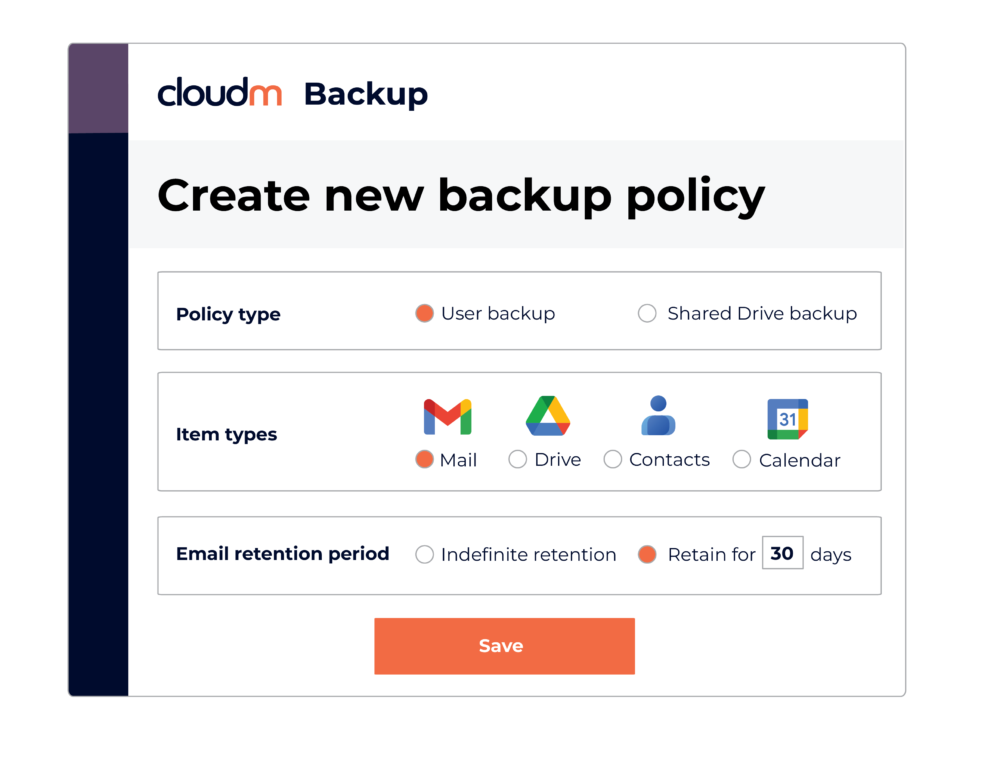
We understand that different data requires different levels of protection. That’s why we’re introducing configurable backup intervals.
You can now choose how frequently your data is backed up, balancing security needs with storage costs.
This feature allows you to:
- Improve your security posture: Back up critical data more frequently to minimize potential data loss.
- Optimize data costs: Reduce the frequency of backups for less critical data, saving on storage.
- Tailor to your needs: Set different backup intervals for different types of data (e.g., every 20 minutes for email, daily for calendars and contacts).
Other enhancements for a secure Google Workspace backup:
-
In addition to Google Contacts backup and configurable backup intervals, this release includes several other improvements to CloudM Backup:
- Include/exclude certain file types for backup: Gain more granular control over what data is backed up.
- Distinguish folders and files: Improved clarity in backup and restoration counts.
Archive 2.6 updates:
CloudM Archive also receives key updates in this release:
- Distinguish folders and files: Improved clarity in archive and restoration counts.
- Add folder count: Enhanced reporting and visibility.
This latest release of CloudM Backup and Archive represents our ongoing commitment to providing you with the most robust, flexible, and cost-effective data protection solutions for Google Workspace.
With enhanced control over your backups and improved data security, you can focus on what matters most: growing your business.
Read the full release notes
Find the full release notes including bug fixes and system improvements for this and previous releases here.